Introduction
Oracle’s transition from the Vertex Payroll Tax Engine to the Oracle Payroll Tax Engine (OPTE) marks a major shift in payroll tax management. With Vertex support ending in April 2026 under Oracle Cloud Release 26A, organizations must prepare now to avoid compliance issues and payroll disruptions.
This article focuses on the step-by-step migration process—planning, configuration flows, validation, and testing—so you can execute a smooth transition.
1. Why migrate to OPTE
OPTE introduces a modernized payroll tax framework designed to improve compliance, accuracy, and integration within Oracle Cloud HCM. Key advantages include:
- Native integration with Oracle Payroll
- More accurate jurisdiction detection using geospatial mapping
- A single-page view of employee work and resident tax addresses
- Faster updates with minimal downtime
- Better control over payroll tax calculations and legislative updates
Migrating early helps you avoid last-minute challenges and benefit from improved efficiency and automation.
2. Preparing for the migration
Before starting the migration, proper preparation reduces errors and keeps data consistent.
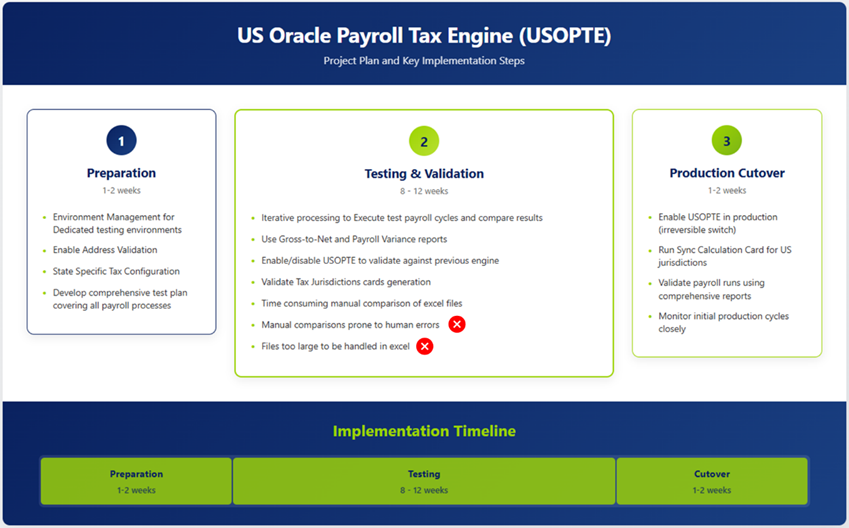
Step 1 — Set up the test environment
- Use a dedicated test pod for OPTE validation.
- Schedule regular data refreshes from production so the test environment stays current.
- Create a comprehensive test plan with validation steps, expected results, and reporting checkpoints.
3. Oracle’s migration framework
Oracle provides a structured process to switch from Vertex to OPTE efficiently.
Step 2 — Enable enhanced address validation
Navigate to: Setup and Maintenance → Manage Features by Country or Territory
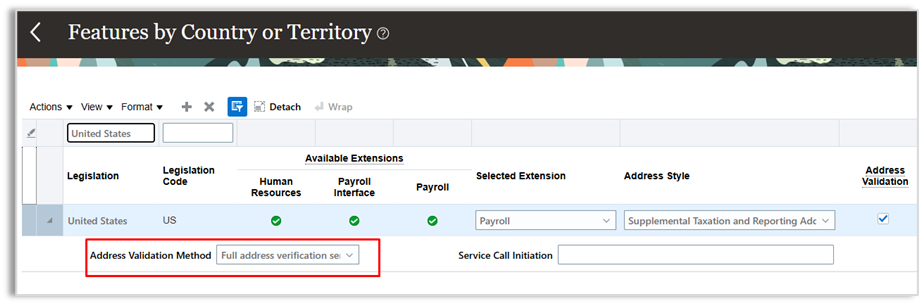
Note: If you do not see the option under Manage Features, run the Run Feature Upgrade payroll flow. When searching for the flow, leave the legislative data group value blank.
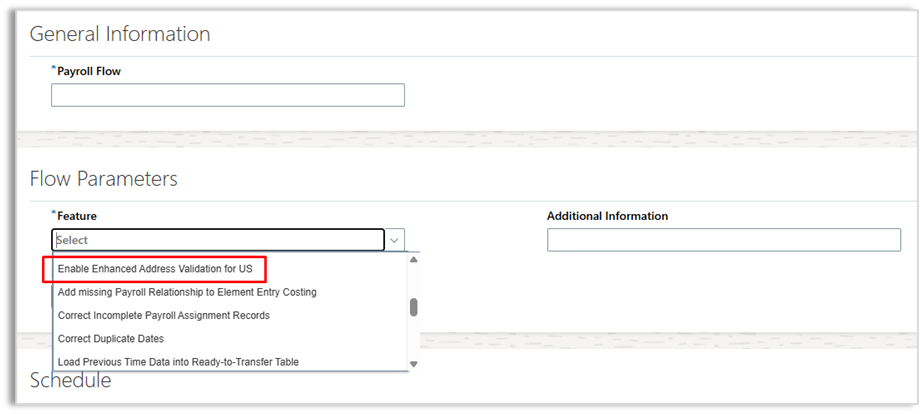
Step 3 — Run the Load Geographies process
- Navigate to: My Client Groups → Payroll → Submit a Flow → Load Geographies
- Purpose: Updates Oracle’s master geography dataset for accurate jurisdiction mapping.
- Parameters:
- Legislative Data Group (LDG): Select your U.S. LDG
- Geography Type: All Geographies
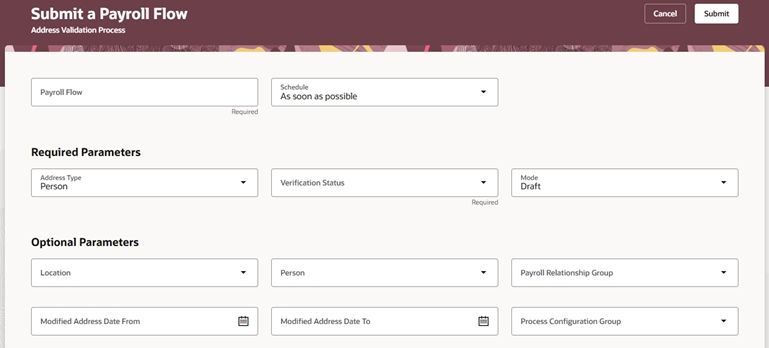
Step 4 — Validate employee addresses
- Navigate to: My Client Groups → Payroll → Submit a Flow → Address Validation Process
- Purpose: Ensures accurate tax jurisdiction mapping.
- Recommended approach: Run first in Draft Mode, review and correct invalid addresses, then rerun in Final Mode.
Step 5 — Run initial configuration processes
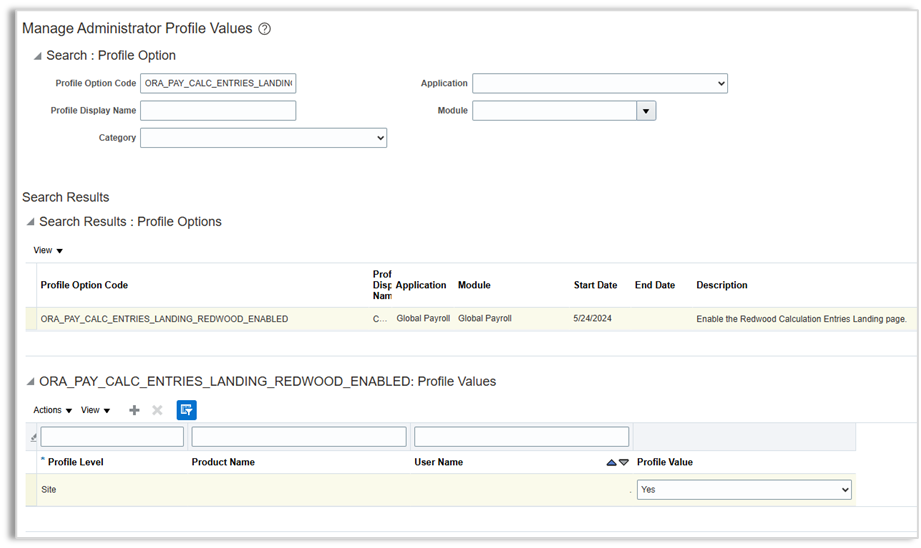
a) Enable Redwood calculation entries
- Navigate to: Setup and Maintenance → Manage Administrator Profile Values
- Set profile option code
ORA_PAY_CALC_ENTRIES_LANDING_REDWOOD_ENABLED→ Value: Yes
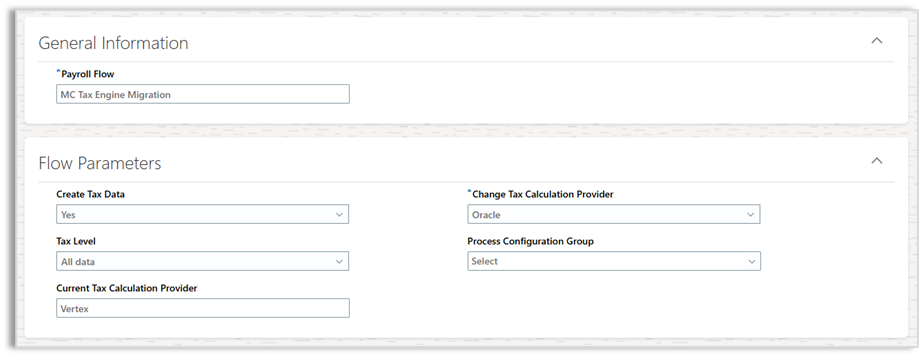
Manage Tax Engine flow
- Navigate to: My Client Groups → Payroll → Submit a Flow → Manage Tax Engine
- Parameters:
- Payroll Flow Name: “Enable OPTE Migration”
- Create Tax Data: Yes
- Tax Level: All Data
- Change Tax Calculation Provider: Oracle
Validate OPTE installation
- Navigate to: My Client Groups → Payroll → Values Defined by Criteria
- Verify that US_NGTAX data is returned, confirming OPTE activation.
Step 6 — Sync calculation cards
- Navigate to: My Client Groups → Payroll → Submit a Flow → Sync Calculation Cards
- Purpose: Copies jurisdiction data to tax withholding cards.
- Recommended options: Sync Local Jurisdictions; sync Pennsylvania PSD codes if applicable.
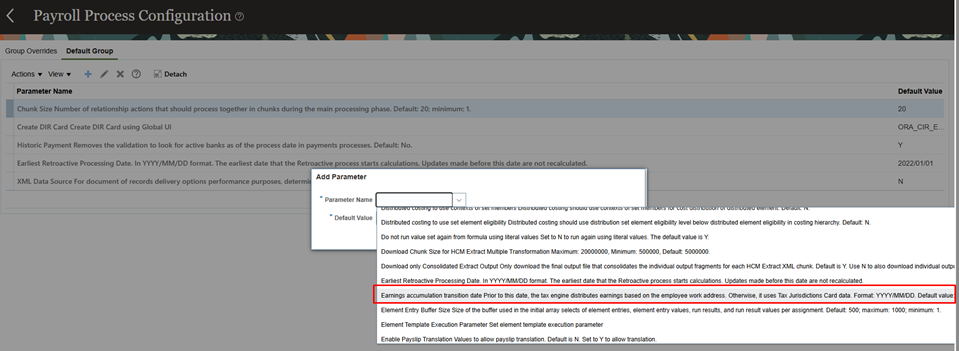
Step 7 — Set the earnings accumulation transition date
- Navigate to: My Client Groups → Payroll → Payroll Process Configuration
- Set the date one day after the last Vertex payroll run to avoid mismatches.
4. Testing strategies
Testing ensures a smooth transition and accurate tax calculations. Oracle supports two approaches depending on Create Accounting usage:
Path A: Create Accounting used
- Reload timecards into a cloned test environment.
- Run reconciliation tests before switching to OPTE.
Path B: Create Accounting not used
- Roll back and rerun payrolls within the same period under both Vertex and OPTE.
- Easier comparison and reduced setup adjustments.
5. Pre-migration reports and best practices
Before switching, generate these reports under Vertex for each payroll period:
- Payroll Activity Report (CSV recommended for large datasets)
- Statutory Deduction Register
- Employee Active Balance Reports
- Tax Calculation Reports (optional)
Best practices:
- Organize reports by Engine → Pay Period → Report Type.
- Ensure time zones and effective dates are consistent.
- Store reports in a version-controlled repository for traceability.
6. Finalizing the switch to OPTE
After completing setup and testing:
- Rerun payrolls using OPTE.
- Generate the same reports under OPTE as you did under Vertex.
- Compare outputs to validate accuracy and catch discrepancies early.
Conclusion
Migrating from Vertex to OPTE is a critical step for organizations using Oracle Cloud Payroll. By following Oracle’s structured migration framework, preparing thoroughly, and performing robust testing, you can complete a seamless transition while maintaining accuracy and compliance.
In a follow-up piece, we will explore how advanced reconciliation tooling can simplify testing, automate comparisons, and accelerate validation during OPTE migration.